When “I have junk” still leaves too much to price.
See how a junk-removal SmartQuote turns a vague pickup request into job context, a controlled range or crew review, and a clear next step, with handoff and follow-up attached.
The customer thinks the request is enough. The business still needs job shape, load size, access, photos, review logic, handoff, and follow-up context before that pickup is safe to price or schedule.
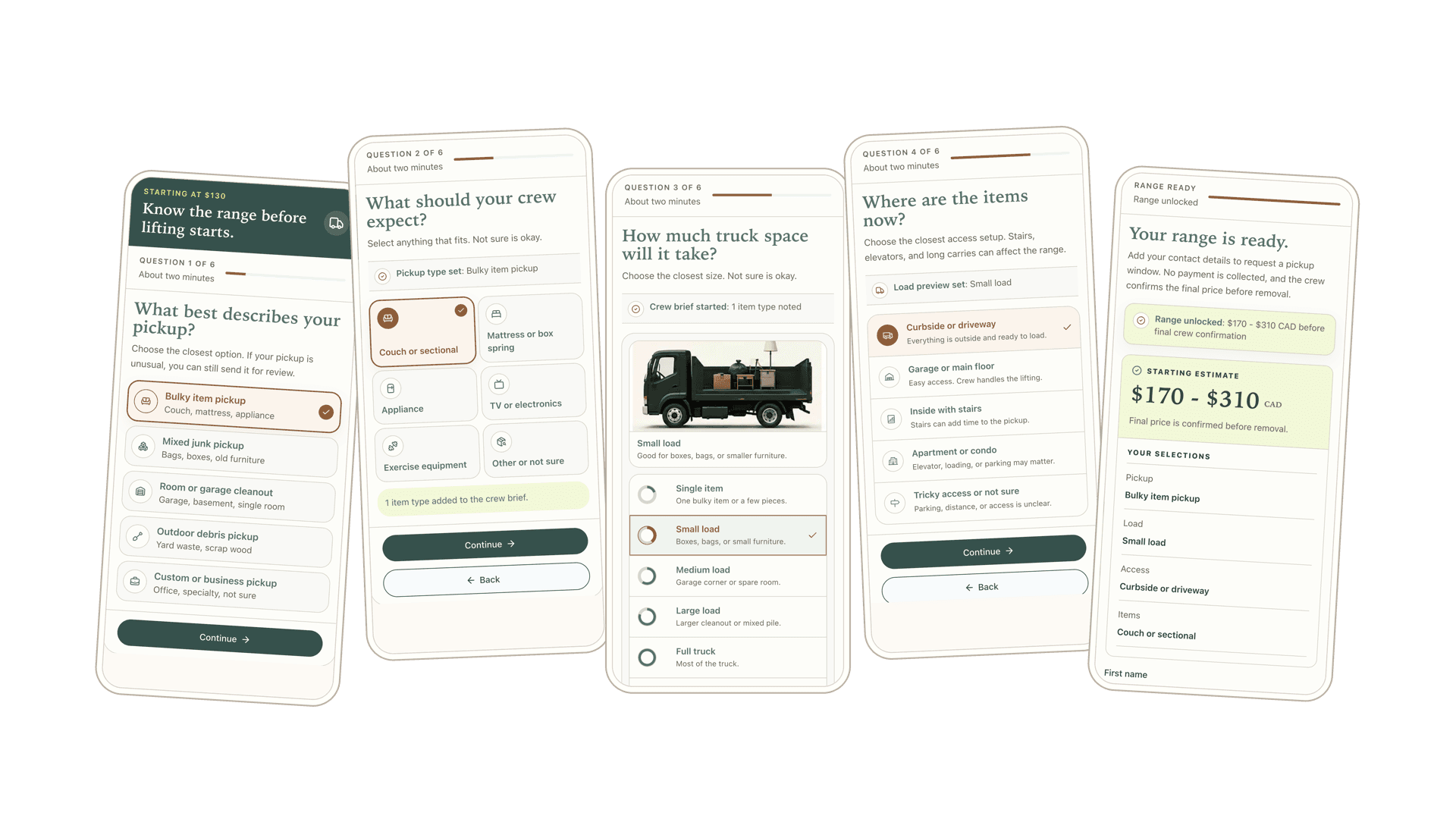
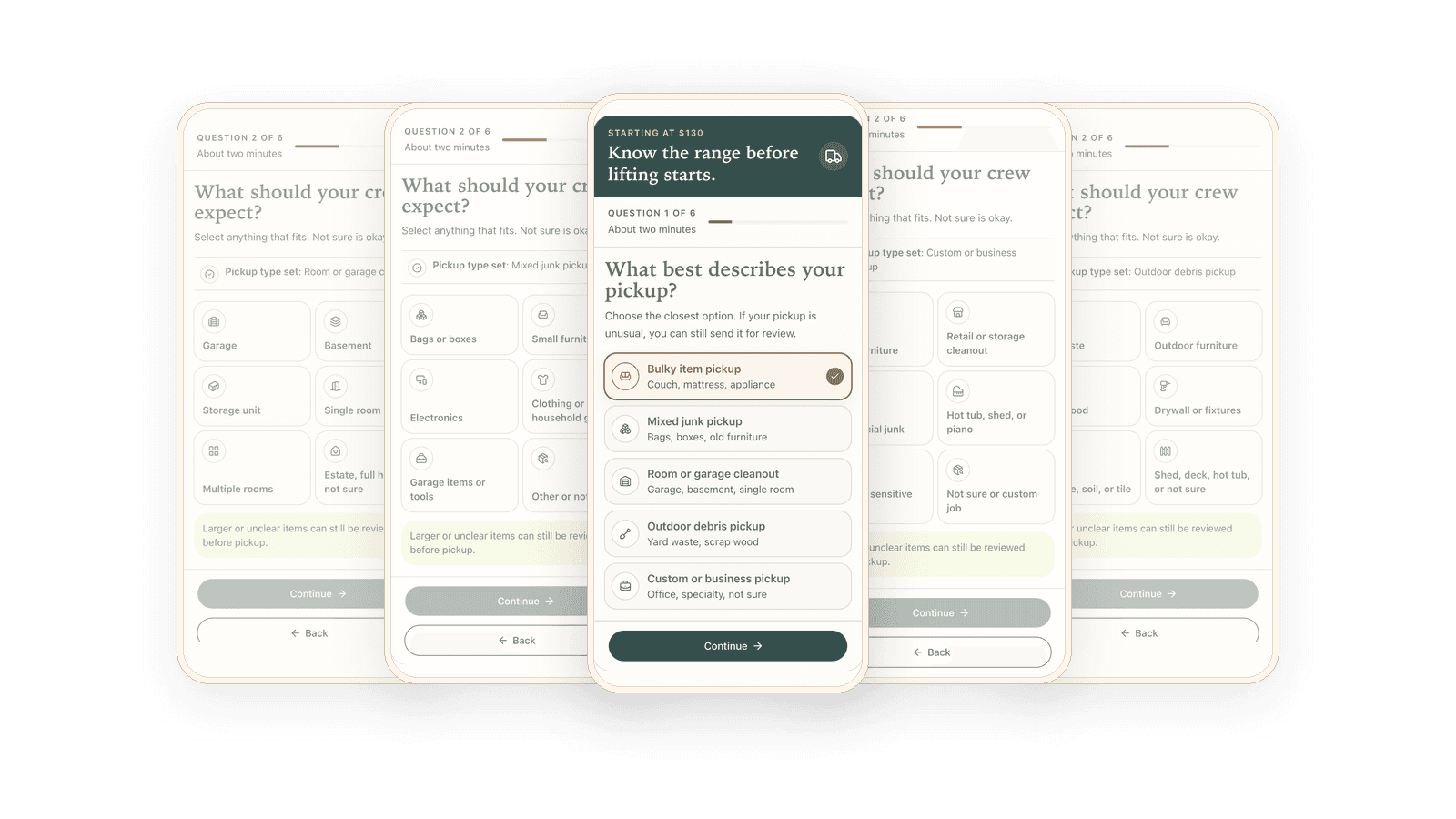
Where a vague pickup request becomes job shape before the team has to chase it.
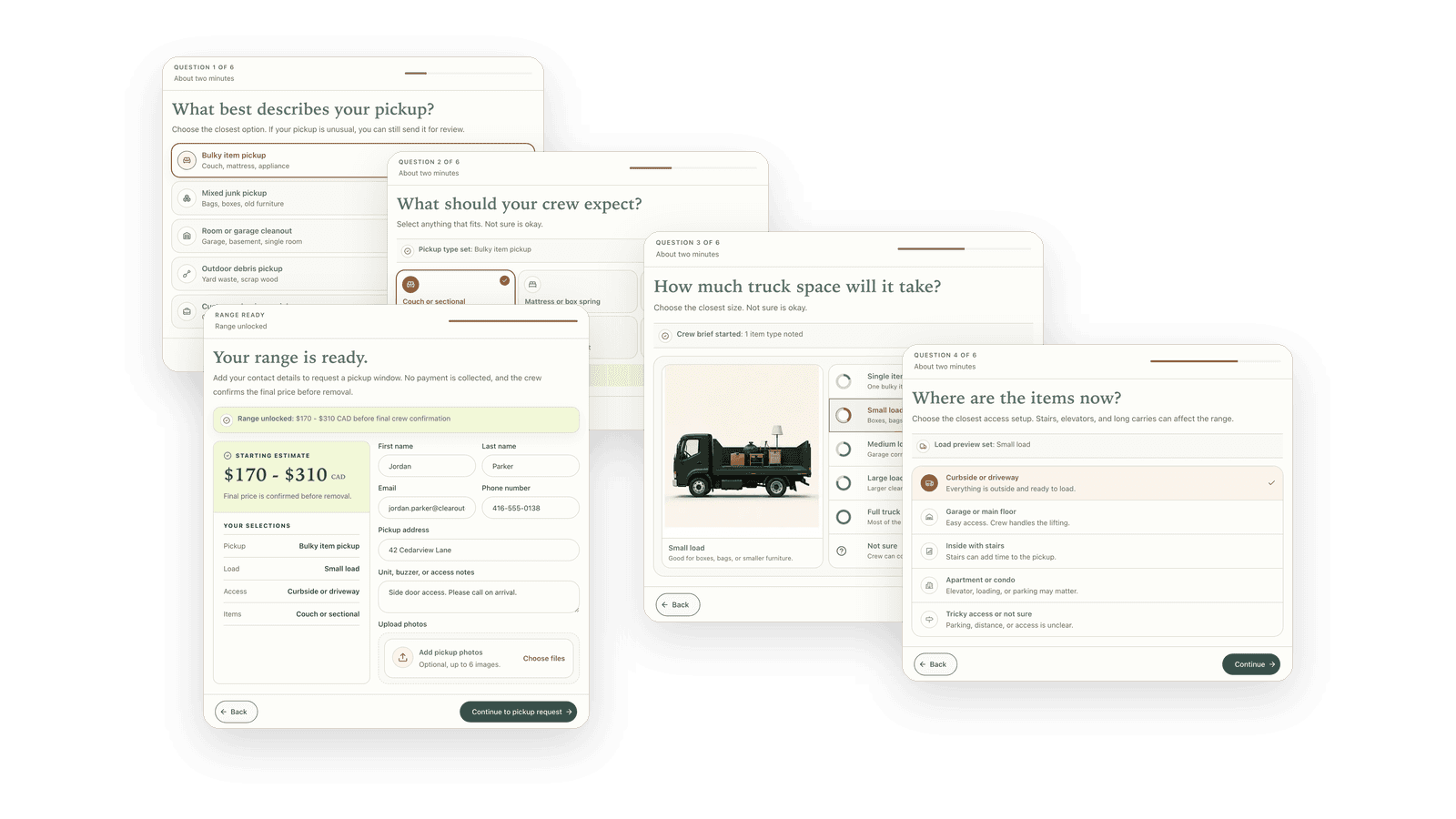
Where truck space, access, stairs, long carry, and photos protect the range before price anchors.
Where simple pickups keep moving without slowing down behind risky jobs.
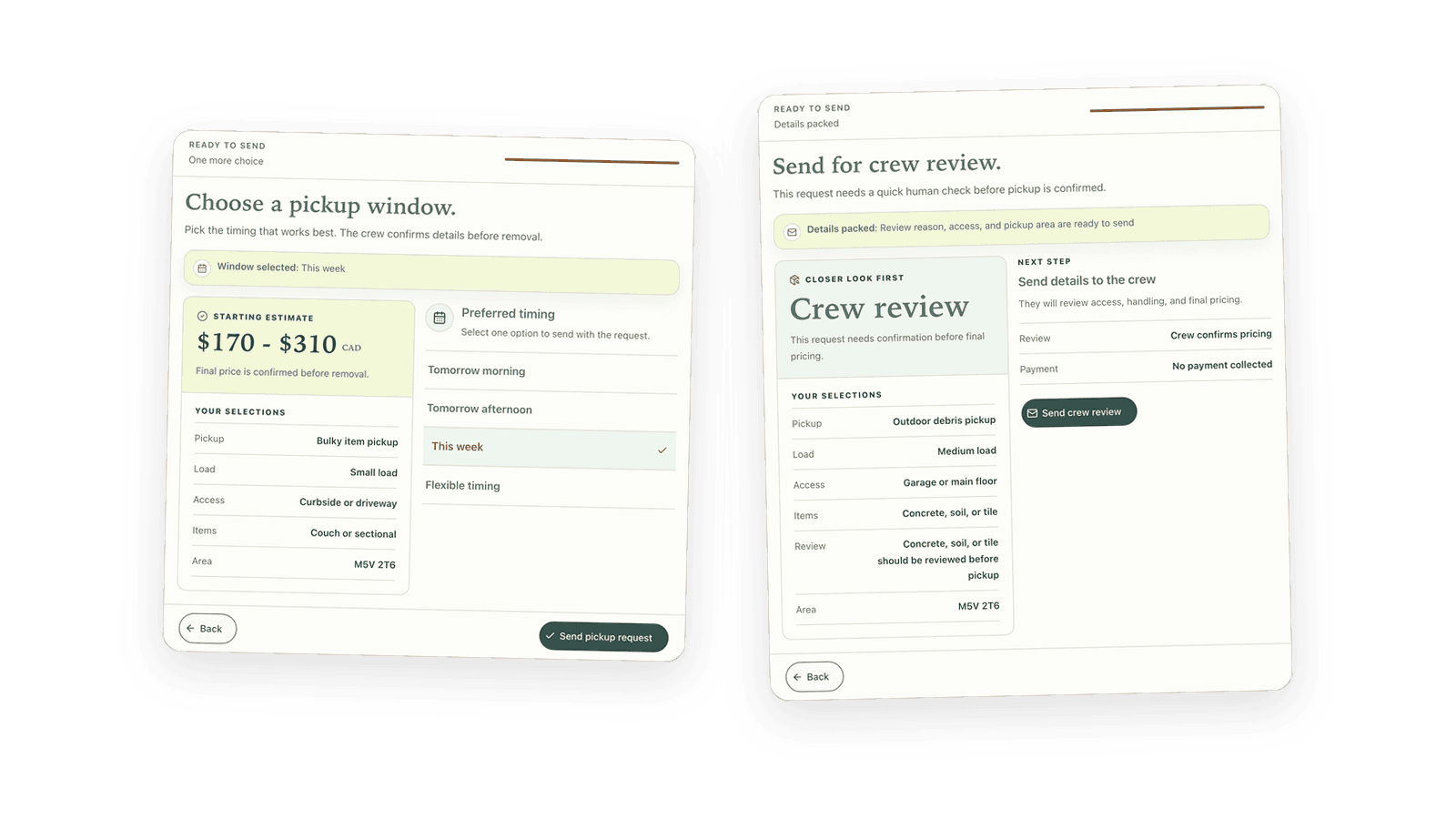
Where crew review, handoff context, and follow-up status stop vague jobs from disappearing.
Focused implementation
A focused first version that fits what you already use.
Start with the quote request that matters most, then expand after the first path is working.
Included
One SmartQuote path, clear team handoff, simple follow-up, and launch checks.
Tool fit
Works with HighLevel or fits around your current CRM, inbox, and admin process.
Timing
Usually 3–4 weeks once pricing, content, and account access are ready.
Quoted separately
Website rebuilds, CRM migrations, extra paths, and complex automation.
01Vague request
A vague pickup request is not a quote-ready lead
A vague pickup request can look like a real lead until someone tries to price it. "I have junk" could mean a curbside couch, a full garage, concrete debris, a third-floor apartment, or a weird item the crew needs to review.
If load size, access, photos, and special-item questions happen after the customer submits, the business may already look slower than the hauler who gave direction first.
The leak is not lead quality. It is trying to price or schedule before the pickup is clear.
Load sizeHow much truck space will it take?Load size unknown
PhotosNo photos to verify items.No item photos
AccessStairs, distance, parking?Access unclear
Heavy itemsHeavy or bulky items unknown.Heavy items unknown
TimingCustomer availability not provided.Timing missing
02Job routing
Sort the job, then ask the right details
A couch pickup, mixed junk pile, garage cleanout, outdoor debris job, commercial pickup, and heavy debris load should not all get the same questions or price assumptions.
When every pickup lands in one generic form, simple jobs slow down and risky jobs look too casual. SmartQuote separates the job shape early, then asks the details that fit that selected pickup.
Simple pickups stay fast while crew-sensitive jobs get the right detail before price.
03Price protection
Protect the price before showing a range
The owner is stuck between speed and risk: give no price and the customer keeps shopping, or give a number before truck space, access, stairs, heavy material, long carry, or photos are clear and defend it later.
SmartQuote uses load size, access, photos, and review flags to make the range useful without turning it into a risky final price promise.
Price clarity moves the customer forward while final confirmation stays protected.
04Customer next step
Give the customer a safe next step
After a customer sees range or review direction, the quote path should not end on a dead thank-you page while they keep calling other haulers.
Clearer jobs can move toward timing or booking intent. Uncertain jobs can still move forward with crew review, callback, photo request, or another visible next step.
Intent stays active without pretending every pickup should book instantly.
05Team handoff
Give your team a request they can act on
The crew should not discover the real job at the truck, and the office should not have to reconstruct the pickup from a short note.
The handoff can carry pickup type, item details, load size, access, photos, postal code, range shown, review reason, source, status, owner, and next action into the tools or process the team already uses.
The team can act from pickup context instead of rebuilding the request after the customer already asked.
Outdoor debris pickupYard waste · branchesWebsiteRange readyConfirm accessTomorrow, 9:00 AM
Appliance removalFridge + washer pickupSearchFollow-up activeFollow upMay 23, 9:30 AM
Bulky item pickup
M5V 2T6Quote page
Ready for review
Request summary
Customer needs a couch or sectional removed. Photos are attached, access looks clear, and the load size needs confirmation before a final price.
Selected details
Pickup typeCouch or sectional
Load sizeSmall loadAbout 1/4 to 1/2 truck.
AccessCurbside or drivewayNo stairs, clear path.
Photos3 photos receivedPhotos attached for review.
Service areaM5V 2T6
Review reasonLoad size unclearConfirm final price.
Team next step
JMJames M.EstimatorReview before final priceConfirm load size and send pricing.
06Follow-up
Keep the quote from dying after the first touch
A range shown is not the same as a pickup booked. Photos missing, crew review needed, callback requested, timing selected, and quote not booked are different open loops.
SmartQuote follow-up keeps the next action tied to quote status instead of whoever remembers to check the thread at the right time.
Range-sent and review-needed pickups stay visible until they are booked, reviewed, or followed up.
Scattered follow-up
No single status or owner.
Junk pickup price requestInbox
Unknown numberMissed call
Name + phone + item listWebsite form
Call back about pickupReminder note
Status unclear
VSStatus-based follow-upFollow-up record
AutomatedEmailWe received your junk removal requestDelivered
AutomatedEmailYour junk removal estimate range is readyDelivered·Opened
Photo askSMSCan you send item photos before we confirm?Sent
QueuedEmailChoose a pickup window for your quoteQueued
CustomerSMSI can send photos tonightReplied
From leak to quote path
Turn the junk form into a usable quote path.
The normal form does not fail because it captures nothing. It fails because it captures interest without resolving what the pickup actually is, whether the range is safe, or what should happen next.
SmartQuote bridges the gap between request captured and pickup moving: vague request becomes job context, risky price becomes range or review, dead-end submit becomes next step, and scattered notes become handoff and follow-up.
Quote leak:Old pathSmartQuote path
01
Vague request
Old path
Vague "I have junk" message with the real pickup still unknown
SmartQuote path
Job shape, item details, load, access, and review signals
02
Price risk
Old path
Number given before the price drivers are clear
SmartQuote path
Truck space, access, photos, safe range, or crew review
03
Next step
Old path
Submit page leaves the customer waiting
SmartQuote path
Range path, timing path, callback, photo request, or crew review
04
After submit
Old path
Crew or office reconstructs the job from scattered notes
SmartQuote path
Pickup context, owner, status, next action, and follow-up
This fits before Jobber, Housecall Pro, QuoteIQ, HighLevel, OpenPhone, email, or your dispatch process. SmartQuote sends a clearer pickup record into the process your team already uses, with load size, photos, access, review decisions, and the next action already attached.
Questions this example answers
01Can a junk removal SmartQuote give a final price online?
A junk removal SmartQuote can show a useful range for clear, safe pickup requests. Jobs with unclear load size, access issues, heavy material, special items, missing photos, or unusual scope should route to crew review, callback, photo request, or final confirmation before a firm price.
02Does this replace Jobber, Housecall Pro, QuoteIQ, HighLevel, or OpenPhone?
No. The SmartQuote path fits before or around the tools a junk removal team already uses. Its job is to make the pickup request clearer, route review when needed, and hand off job context before the request reaches dispatch, sales, phone, or CRM workflows.
03Why ask load size, access, and photos before contact?
Truck space, stairs, elevator access, long carry, heavy debris, and photos decide whether the range is safe. Asking those details before contact reduces vague callbacks and helps the crew avoid discovering the real job at the truck.
04What happens to vague or risky pickup requests?
Vague or risky pickups can still move forward. Instead of forcing an instant booking, the SmartQuote path can route the request to crew review, callback, or a photo request with a visible reason and follow-up status.
Review the quote path
Show us your junk-removal quote path. We’ll point out where pickups stay vague.
We’ll map what should be captured before the range, which pickups need crew review or photos, and which quote statuses need follow-up after the range.