When "window cleaning quote" still leaves too much to price.
See how a basic window-cleaning request becomes scope, count, access, add-ons, timing, and handoff context before the owner has to chase details or clarify the range.
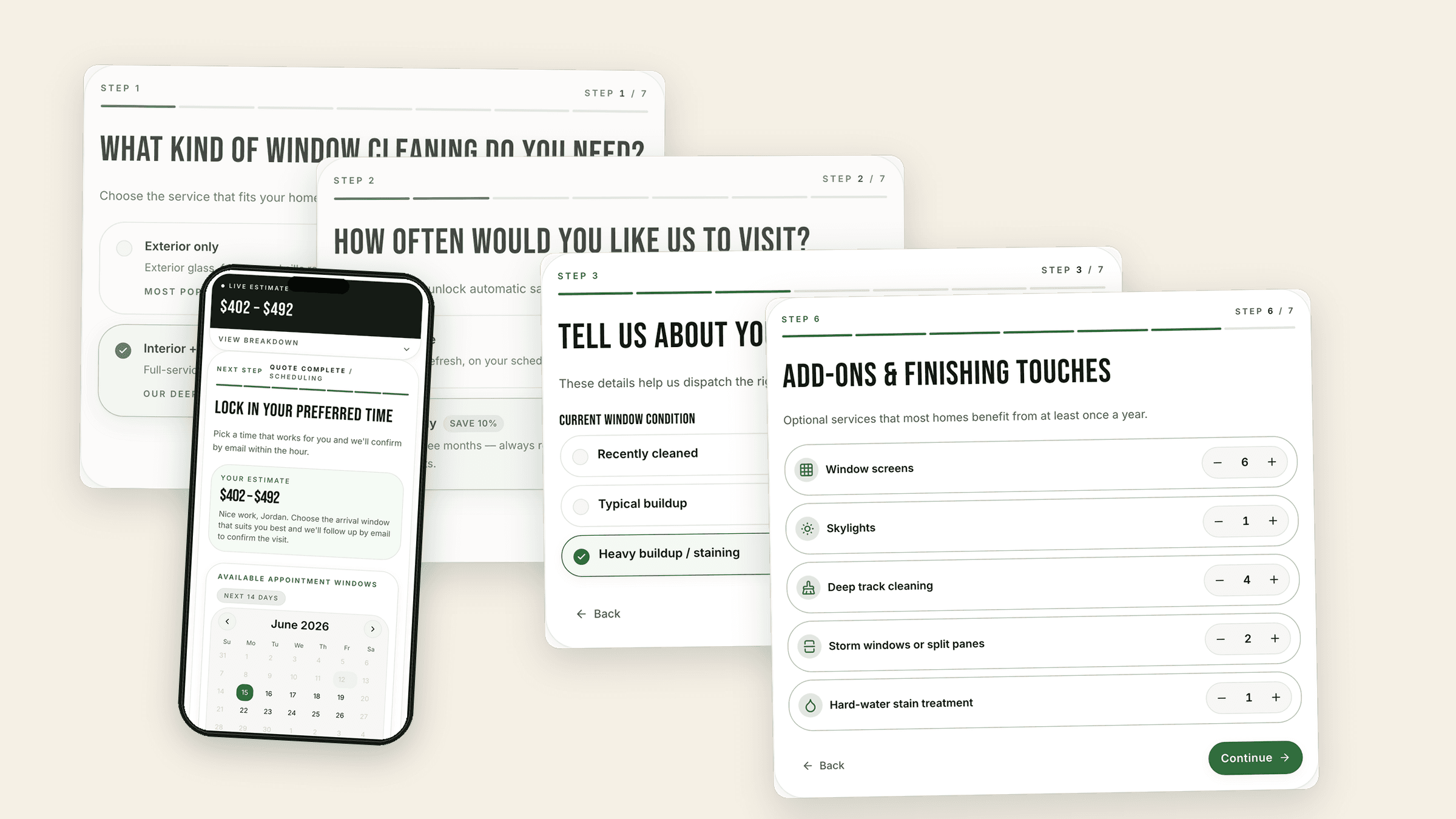
The homeowner thinks the request is done. The business still needs service side, count, access, add-ons, timing, and follow-up context before that lead is safe to price or schedule. Each screen below shows a customer step and the owner-side leak it closes.
Start with the request the homeowner thinks is complete.
Separate service, frequency, condition, and access before the range.
Catch counts and add-ons before they turn into objections.
Carry timing, handoff, and follow-up past the thank-you page.
Focused implementation
A focused first version that fits what you already use.
Start with the quote request that matters most, then expand after the first path is working.
Included
One SmartQuote path, clear team handoff, simple follow-up, and launch checks.
Tool fit
Works with HighLevel or fits around your current CRM, inbox, and admin process.
Timing
Usually 3–4 weeks once pricing, content, and account access are ready.
Quoted separately
Website rebuilds, CRM migrations, extra paths, and complex automation.
01Thin request
The request sounds simple. The job is still unclear.
A homeowner types "window cleaning quote," but the business still does not know side, count, screens, tracks, stains, upper floors, access, or repeat potential. SmartQuote turns that thin request into the first guided step before price becomes the conversation.
Price does not enter until the request has enough context to move.
Website window request
Tell us what you need and we’ll get back to you.
Send request
Team view
What we see after a simple request.
Not quote-ready
Window cleaning quoteReceived: Today, 10:18 AM - Source: Quote page#RQ-7421
Service scopeInterior, exterior, or both?Scope unknown
Window countStandard, large, and upper-floor windows?Count missing
AccessUpper floors, ladders, slopes, or tight paths?Access unclear
Add-onsScreens, tracks, skylights, or hard-water stains?Add-ons unknown
TimingPreferred visit window not provided.Timing missing
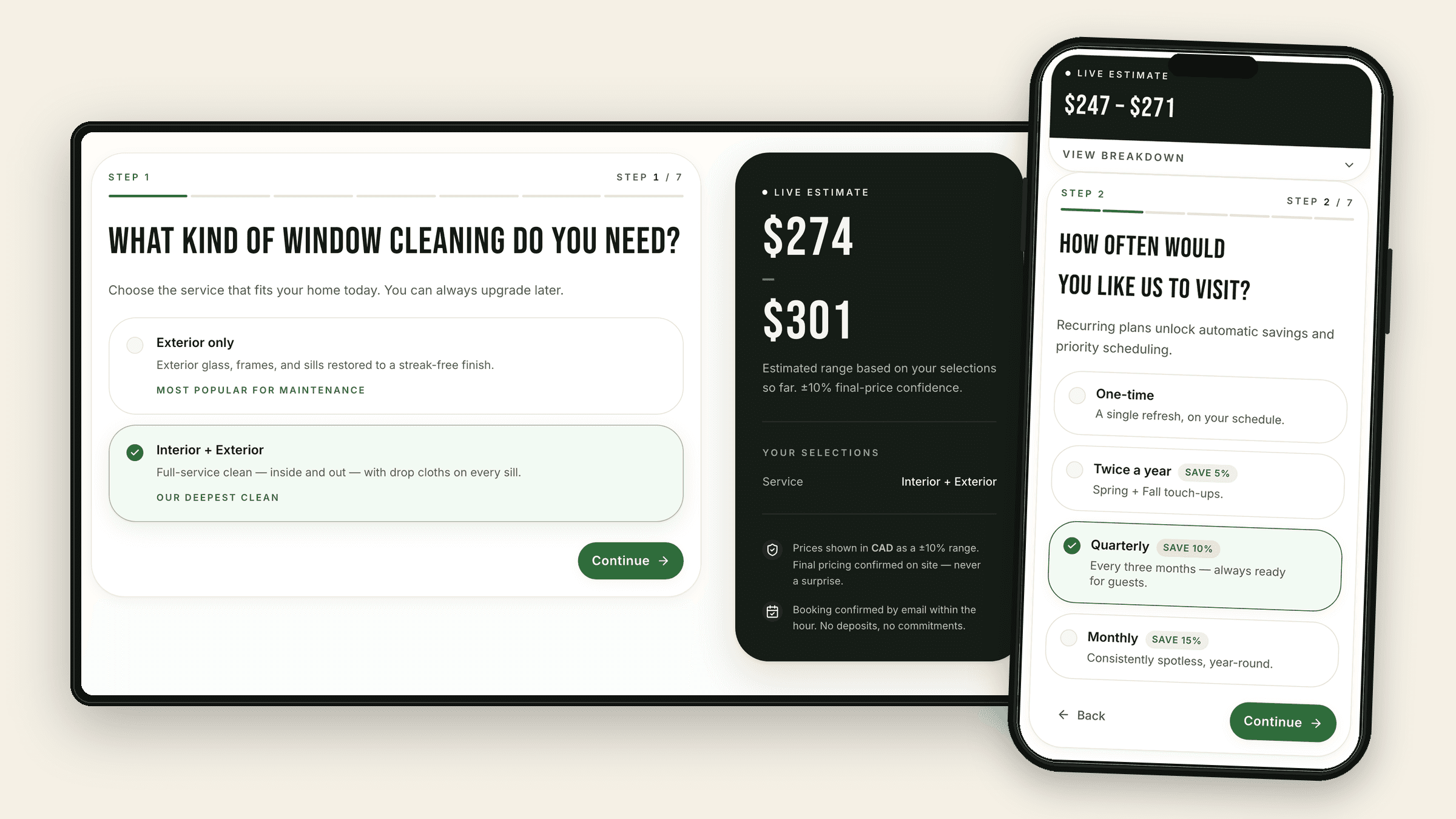
02Scope split
Split exterior-only, inside/outside, and repeat work before price.
Exterior-only, interior + exterior, and recurring service carry different labor, access, and schedule assumptions. SmartQuote asks service side and frequency first so the range starts from the job the customer actually wants.
Different window jobs stop getting forced through the same quote path.
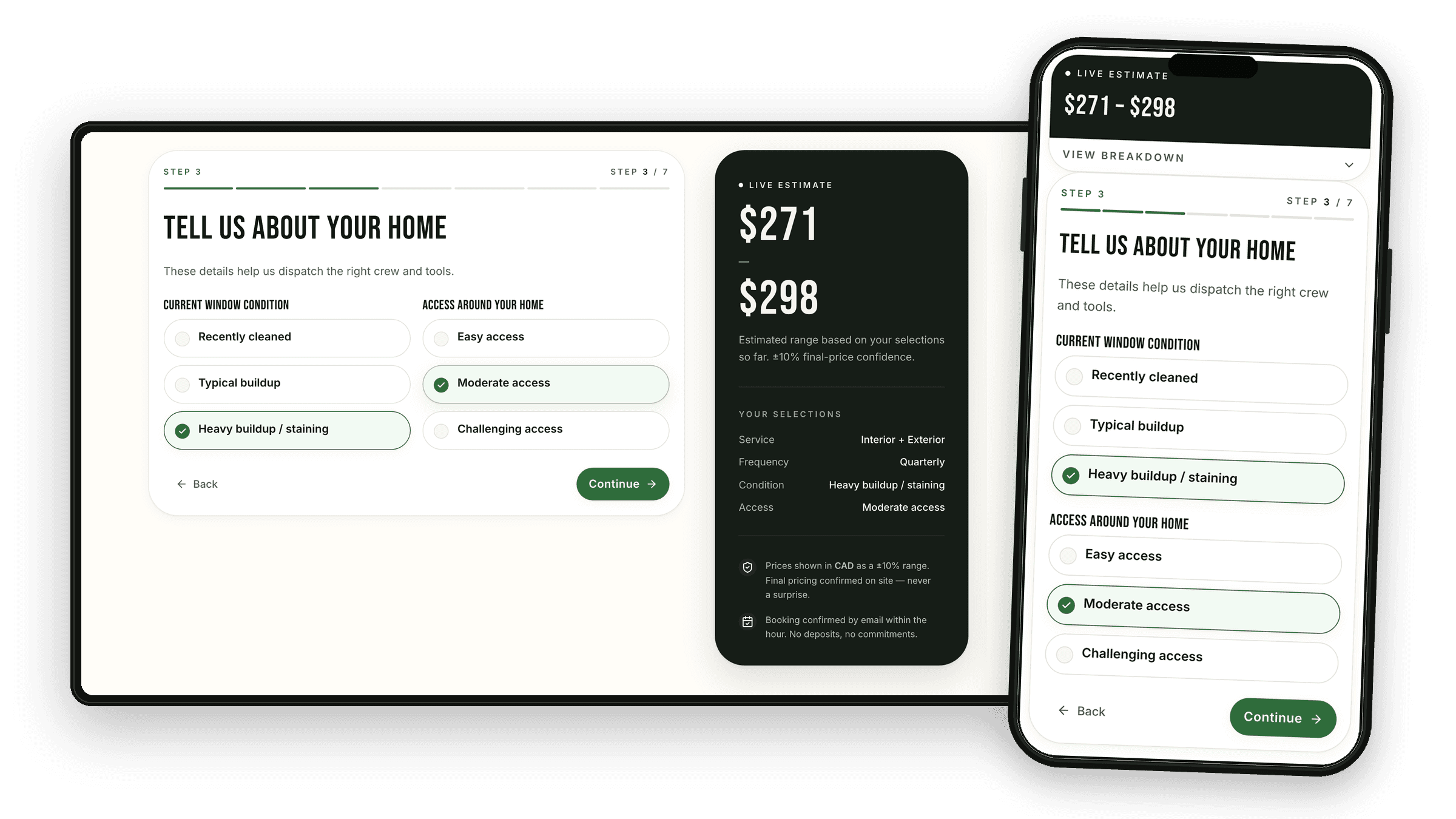
03Risk signals
Bring buildup and access risk forward.
Heavy buildup, hard-water marks, ladder work, slopes, landscaping, and upper-floor access can turn a simple-looking request into review. SmartQuote asks before the range, so difficult work does not get mistaken for a standard clean.
Harder jobs get flagged before they become bad estimates.
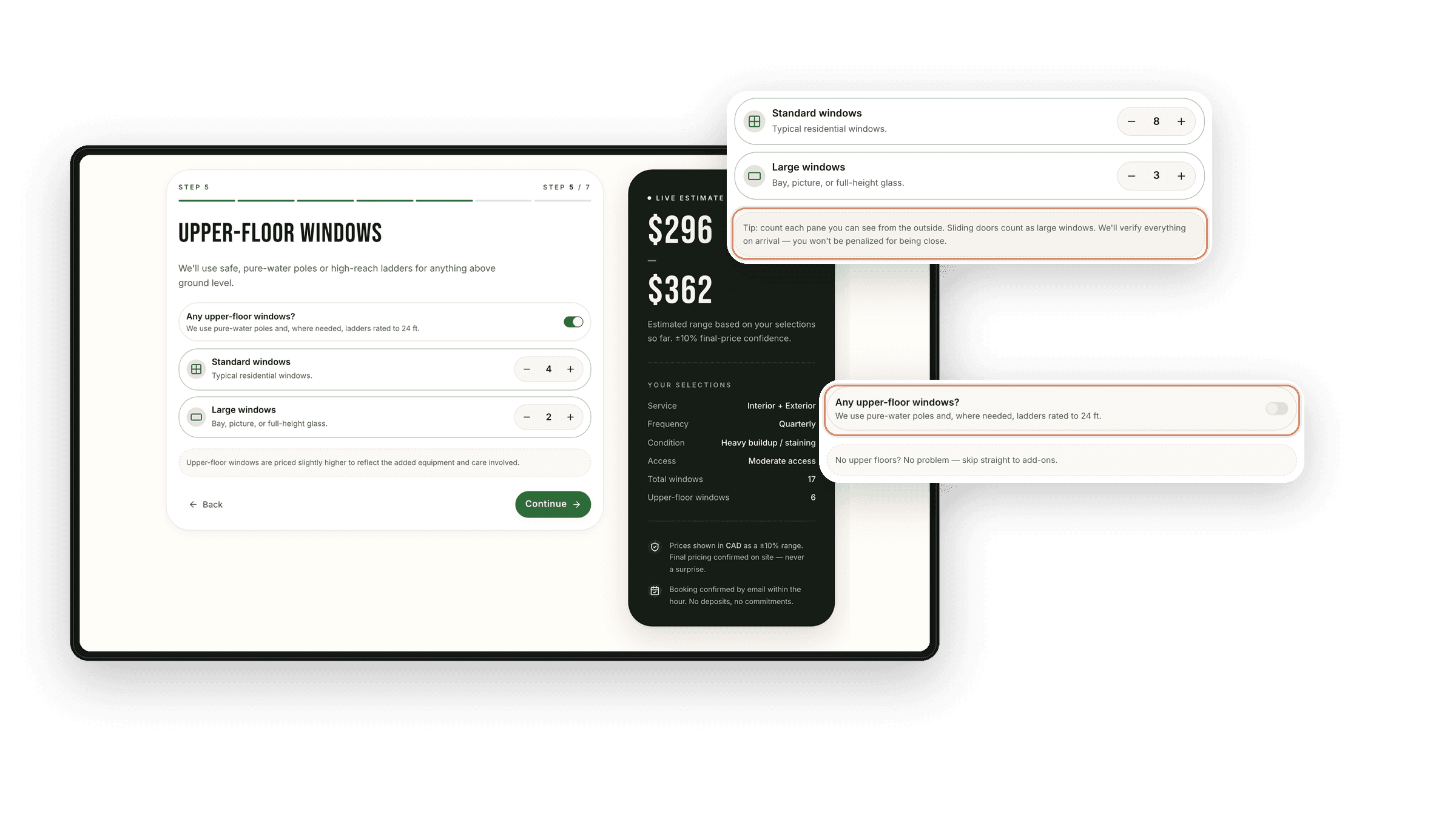
04Count confidence
Get a usable count without pretending the homeowner counts like a pro.
Customers may not know how your business counts windows, panes, sliders, or upper-floor glass. The flow collects first-floor and upper-floor counts as visible assumptions, with room for review when the count is uncertain.
The range has a stated count model instead of a hidden guess.
05Scope protection
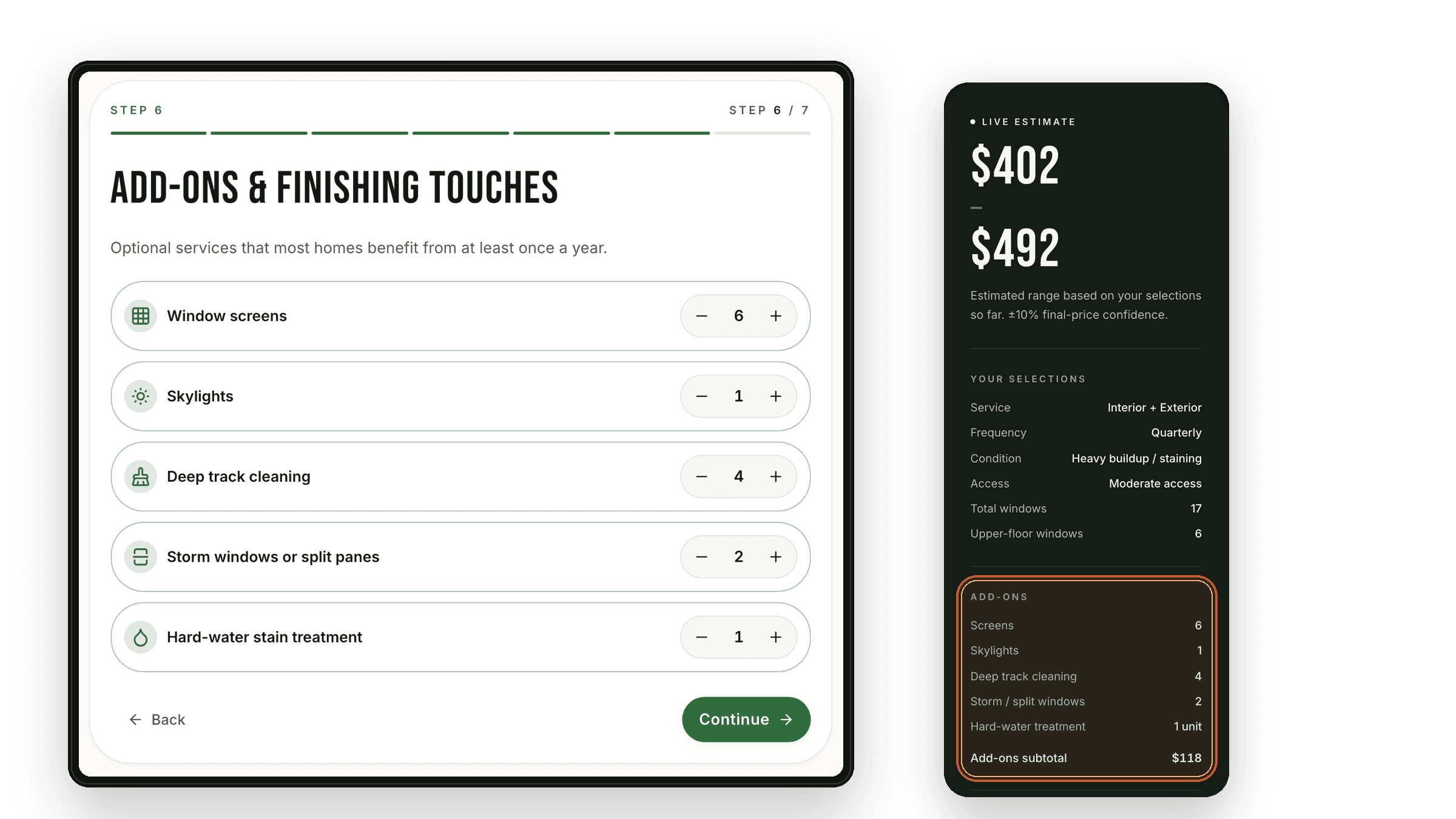
Show price-changing scope before it becomes an objection
Screens, skylights, deep tracks, storm or split panes, and hard-water treatment are where a quote can suddenly feel like an upcharge. Put them before the range so the customer sees what changed the estimate.
Extras are understood before the customer anchors on a number.
06Controlled range
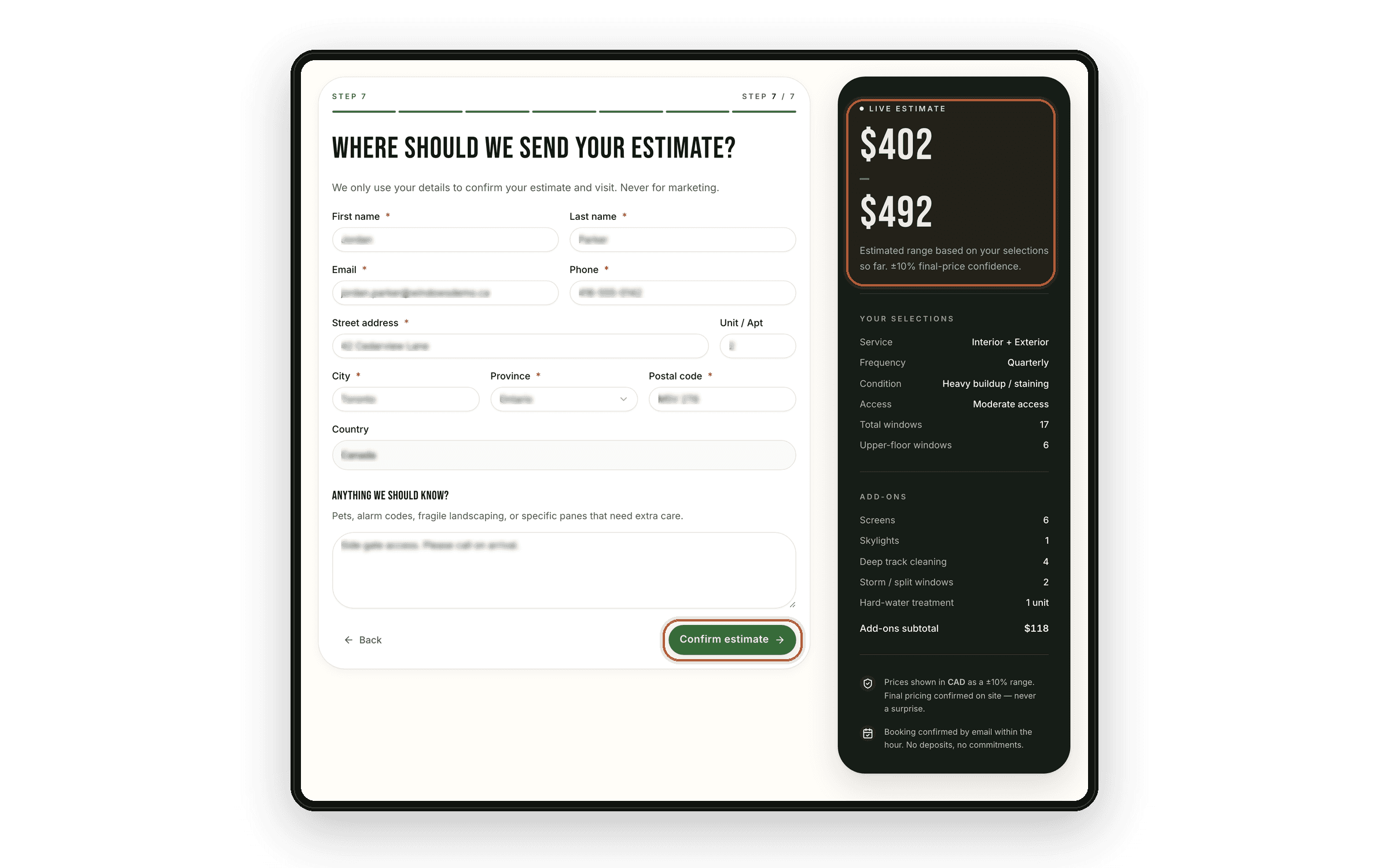
Give a useful range without promising the final price.
No price keeps shoppers looking. A final online price can trap the business before the job is verified. Once scope, count, condition, access, and add-ons are clear, SmartQuote can show a guided range and collect contact/address details for final confirmation.
The lead gets momentum while final price control stays with the business.
07Warm next step
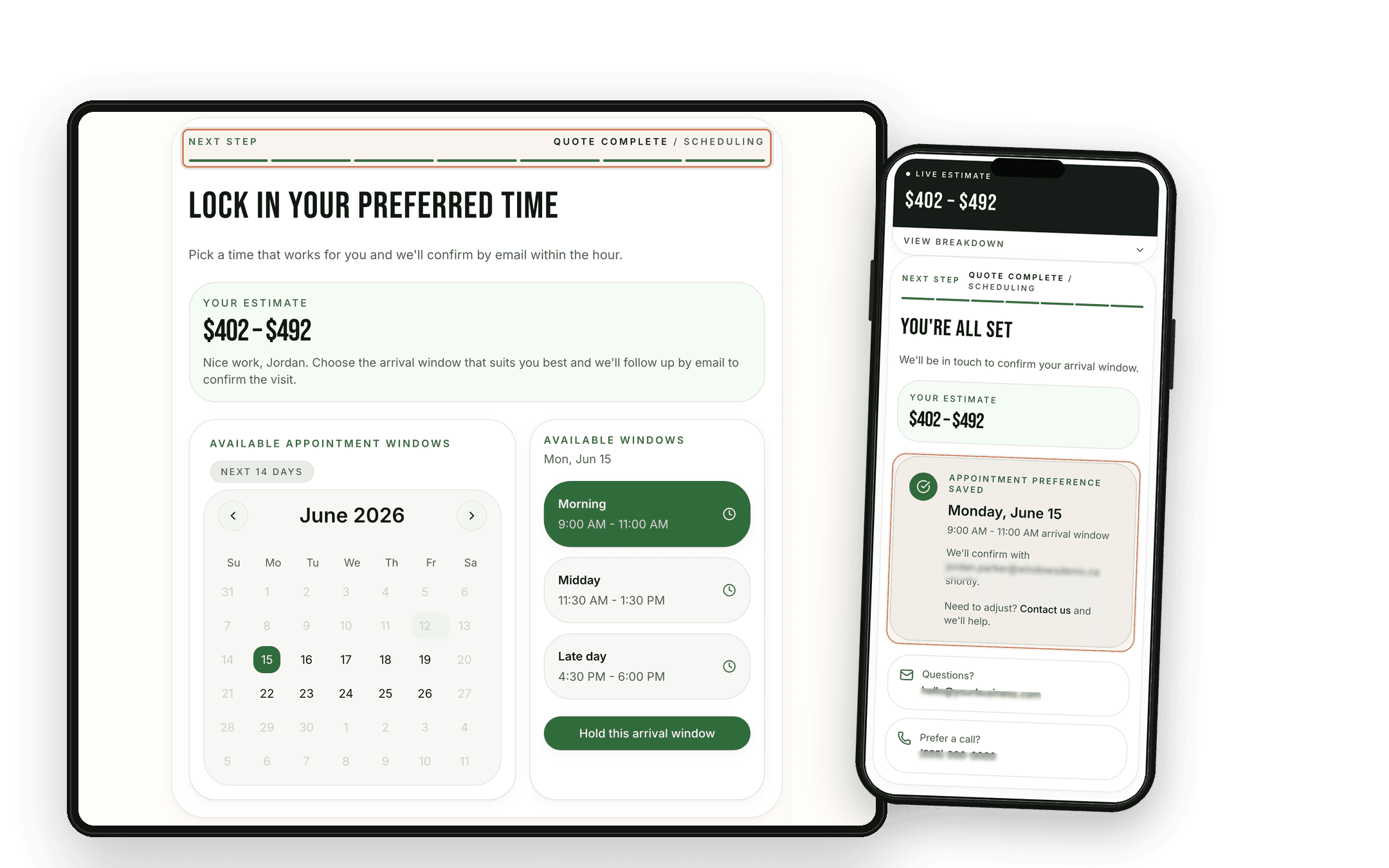
Use the warm moment for timing, not a silent thank-you page.
Right after the range is when the customer is most ready to choose a next step. The demo captures preferred date and arrival window as booking intent, while the business still confirms by email.
Preferred timing is captured before the lead cools off.
08Team handoff
Send the team quote context, not another vague contact.
Name, phone, and a note still make the team restart the sale. This handoff carries service side, count, add-ons, notes, range, source, and next action into the current process without pretending every downstream workflow is already built.
The team continues the quote path instead of rebuilding it from memory.
Customer selected interior + exterior window cleaning with 17 windows, screens, tracks, and quarterly interest. The range shown is $402 - $492, and the requested arrival window is ready for confirmation.
Selected details
ServiceInterior + exteriorGlass, frames, sills.
Window count17 windows11 first-floor, 6 upper.
FrequencyQuarterlyCustomer prefers repeat care.
ConditionHeavy buildupHard-water notes included.
Add-onsScreens + tracks6 screens, 4 deep tracks.
Range shown$402 - $492
Team next step
LMLaura M.EstimatorConfirm arrival windowCheck the requested time and send crew-ready notes.
09Open quote loops
Use quote status to decide the next follow-up.
Range viewed, timing selected, confirmation needed, recurring interest, and quote not booked are different open loops. Follow-up should be mapped around the business, but the next action should come from status, not memory.
Good quotes have a visible next action after submit.
Scattered follow-up
No quote status or timing owner.
Window cleaning quote requestInbox
Unknown numberMissed call
Name + phone + window countWebsite form
Call back about quoteReminder note
Status unclear
VSStatus-based follow-upFollow-up record
AutomatedEmailWe received your window cleaning requestDelivered
AutomatedEmailYour window cleaning estimate range is readyDelivered·Opened
Count checkSMSCan you confirm upper-floor windows?Sent
QueuedEmailChoose an arrival window for your cleaningQueued
CustomerSMSTuesday morning works for usReplied
Before / after
The customer path becomes a clearer quote path.
A basic form captures the message and leaves the team to chase scope, count, access, add-ons, timing, and follow-up status. The SmartQuote path makes those decisions visible while the customer is still engaged.
Quote leak:Old pathSmartQuote path
01
Scope
Old path
A "window cleaning quote" request with scope still unknown
SmartQuote path
Service side, frequency, condition, and access defined before price
02
Range
Old path
Customer sees a number before counts, screens, tracks, or stains are clear
SmartQuote path
Counts and add-ons create visible assumptions before the estimate
03
Intent
Old path
Range submitted into a thank-you page with no timing signal
SmartQuote path
Preferred timing captured after submit, with email confirmation
04
Handoff
Old path
Contact record arrives and the team reconstructs the job
SmartQuote path
Quote context and status carry into handoff and follow-up
SmartQuote fits before HighLevel, Jobber, Housecall Pro, ResponsiBid, Quoti, email, text, or your admin process. It sends that system a cleaner quote record with the scope, range, and next action already attached.
Window cleaning SmartQuote example FAQ
01Isn't this too many questions for a window cleaning lead?
Only if they feel unnecessary. A good window-cleaning SmartQuote asks for the details that change price, timing, or review: service side, count, access, condition, add-ons, contact, and timing intent.
02Can this give an exact final price online?
It can show a useful estimate range, not a guaranteed final price for every property. The range keeps the lead moving while final pricing stays protected until the job is confirmed.
03What if the customer counts the windows wrong?
The flow does not pretend the online count is perfect. It creates enough count structure to support a useful range and a better handoff, while leaving room for final confirmation when the job is verified.
04Why ask for timing if it is not a confirmed booking?
Because timing intent is valuable while the lead is warm. In the current demo, the quote submits first, then the customer chooses a preferred date and arrival window. The business still confirms by email.
05Does this replace HighLevel, Jobber, Housecall Pro, ResponsiBid, or Quoti?
No. The SmartQuote path makes quote context clearer before it reaches the tools the business already uses. In this demo, validated quote details are sent to HighLevel; a real install would shape handoff and follow-up around the current process, not replace it.
06What happens if they see the range but do not book?
That is the open loop the follow-up record is meant to expose. A real install can cue follow-up from quote status: range sent, timing selected, confirmation needed, recurring interest, or quote not booked. The exact messages depend on the business, while the follow-up state stays visible.
Review the quote path
Show us your window-cleaning quote path. We’ll point out where the team still has to chase scope or explain the range.
We’ll map what should be captured before the range, what should reach HighLevel or your current tools, and which statuses need follow-up after submit.